The project began with an apparently modest requirement: double-click a Markdown file and see the whole thing rendered before the gesture has emotionally completed.
Not edited. Not indexed. Not welcomed into a workspace with a sidebar full of life choices. Just opened.
Markdown is mostly prose until it suddenly is not: tables, footnotes, task lists, math, syntax highlighting, Mermaid diagrams, GitHub-style alerts, frontmatter, and the small local dialects people accumulate because plain text is where software teams hide their furniture.
The requirement sounded like a viewer. The feature list sounded like a renderer. Those are not the same job.
The native trap
My first instinct was the respectable one: make it native.
SwiftUI gives you the document model, recent files, Finder integration, system typography, native menus, and, on macOS 26, the actual Liquid Glass materials rather than a CSS impression of them wearing a nice shirt. The problem was not the chrome. The problem was the document.
Once the feature list stopped being “render some Markdown” and became “render the Markdown people actually have,” the native route quietly changed jobs. It was no longer an app project. It was a Markdown engine project, with a decorative window around it.
That was the point where purity stopped looking like craft and started looking like a trap. A pure SwiftUI surface could be lovely, but the available native Markdown ecosystem did not cover the long tail I needed without either losing features or writing a renderer. I did not want to spend the project discovering, one extension at a time, that the thing people call Markdown is really a series of treaties nobody fully signed.
So I abandoned the native-first version.
The compromise that was not
Tauri was supposed to be the compromise, which is a polite word engineers use when they expect to be annoyed later.
Instead it was faster in the place that mattered. The Rust shell stayed thin. WKWebView came for free on macOS. The renderer could use the Markdown ecosystem that already knows about footnotes, task lists, anchors, attributes, KaTeX, Shiki, Mermaid, and GitHub-style alerts. The surprising part was not that web rendering had better feature coverage. The surprising part was that, once the heavy pieces were split and loaded only when needed, it also fit the startup budget.
The current target is straightforward: cold click to first paint under about 300 ms on Apple Silicon, parse plus first viewport paint under 150 ms, and a main chunk under 1 MB. The architecture exists to keep that path short.
Rust owns application mechanics: command-line path, Finder open event, File -> Open, drag and drop, menus, document state, and file watching. The renderer owns Markdown. An optional SwiftUI shell can still own the most native pieces, especially if the app wants real macOS 26 glass around the document. That is the split that made the project stop fighting itself.
Native surfaces are excellent at being surfaces. Markdown’s real complexity lives inside the page.
The pipeline
The final shape is deliberately unromantic.
Rust opens and watches the file, canonicalizes the path, enforces a 20 MiB safety cap, reads via asynchronous filesystem calls, and sends a document payload to the renderer. A module Web Worker owns the Markdown parser and has a 10-second timeout so a pathological file cannot turn reading into hostage-taking.
The parser uses markdown-it with footnotes, task lists, attributes, anchors, custom math handling, and alerts. Raw HTML is disabled. Frontmatter is stripped. Fences are pre-scanned for languages and Mermaid. Math is detected with a cheap scan. The worker returns HTML, a table of contents, a language set, and two booleans: math and Mermaid.
The main thread then sanitizes the HTML, swaps it into the document, and only after that asks whether it owes the user KaTeX CSS, syntax highlighting, or diagram rendering. A document with no code does not pay for Shiki. A document with no math does not pay for KaTeX. A document with no Mermaid fence does not import the diagram machinery.
This is not clever so much as hygienic. The fastest work is the work you never load.
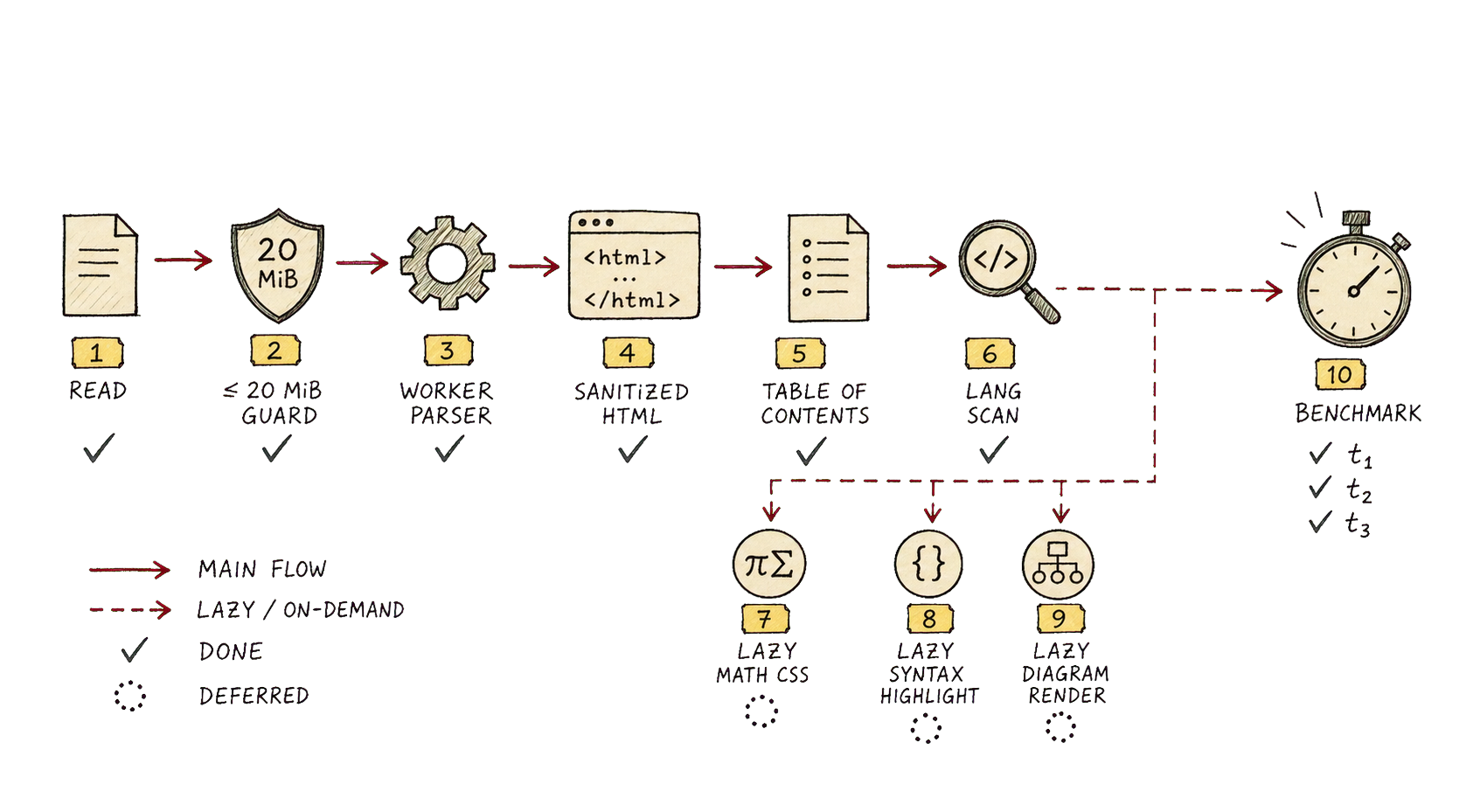
Shiki is dynamically imported and capped to a small number of loaded languages per document before falling back to plainer rendering. Mermaid is scheduled with IntersectionObserver and capped per diagram, because a diagram hidden below the fold should not get to block the first page. The optional SwiftUI shell uses the same built renderer rather than creating a second rendering truth.
The app therefore has two kinds of native. The visible manners are native: windows, menus, file opening, recent files, drag and drop, watching, platform fonts, and potentially the glass chrome. The document engine is web-native because the Markdown ecosystem is web-native in practice, whether one finds that aesthetically satisfying or not.
The numbers
The current benchmark harness is intentionally boring, which is exactly what a benchmark should be.
Using the generated document shapes from the tests, the parser numbers from this pass were comfortably below the budget: 50 KB of prose in 1.8 ms, 200 KB of prose in 6.5 ms, a math-heavy document in 3.6 ms, a mixed realistic document in 3.4 ms, and a README-shaped case in less than half a millisecond.
Those are parser-only, warmed timings. They are not a full app launch measurement, and pretending otherwise would be how benchmarks become folklore. But they explain why the architecture has room to breathe: the parser is no longer the thing standing between the click and the first page.
The build shape tells a similar story. The main JavaScript is roughly 46 KB before gzip and 17 KB after. The main CSS is about 31 KB before gzip and 6 KB after. The worker is larger, as expected, because that is where the parser lives. The heavy pieces are separate: KaTeX JavaScript, Shiki grammars, the WASM regex engine, and Mermaid’s graph dependencies live in lazy chunks, which means they are costs paid by documents that actually need them.
This is the part I like. The feature set is not free, but it is itemized.
What the first version taught
The pure SwiftUI attempt was still useful because it clarified what native should own.
It should own the things the operating system is good at: opening files, remembering recent documents, putting the window in the right place, respecting appearance settings, using the correct materials, integrating with menus, making the object feel like it belongs on the machine. It should not become an unpaid maintainer of every Markdown extension a README has ever smuggled into existence.
There is a broader lesson here about platform taste. “Native” is not a single virtue. Sometimes it means using the operating system’s document model. Sometimes it means using the system webview because that is the native browser engine. Sometimes it means not shipping a huge runtime because the task is reading a file, not launching a small city.
The right answer is not pure. It is respectful of the job.
The next measurement
The obvious missing measurement is a real cold-start benchmark, end to end: Finder click to first meaningful paint, repeated across warm and cold cache, with realistic files and a signed release build. The repo has parser guardrails and bundle-size evidence, but the product claim lives at the edge between LaunchServices, Rust startup, WKWebView initialization, file read, worker parse, DOM swap, and first paint.
That is the measurement I would want before making any grand public claim. Until then, the more careful statement is this: the parser and bundle architecture leave enough headroom that the 300 ms target is plausible, and the current app shape is designed around making the first page appear before optional richness arrives.
The lesson is not that native is slow or that webviews are magic. That would be too neat, and therefore probably wrong.
The more precise version is that native surfaces are excellent at being surfaces, while Markdown’s real complexity lives in the long tail of extensions people already use. The viewer works because it lets each side do the part it is actually good at: macOS opens the document and gives the window its manners; the web renderer handles the messy literary machinery inside the page; and the startup path stays short enough that opening a Markdown file feels like reading, not launching software.